library(tidyverse)
library(DBI)
library(farr)
library(scales)Working with date and times
Datetimes
DuckDB
The purpose of this note is address the topic of temporal data (dates and times) in more detail than found in the “Dates and Times” chapter of R for Data Science (Wickham et al., 2023) and to provide a hands-on application of working with them. The application I work with is based on the SEC submissions data I discussed in another recent note. I study this application using R and DuckDB, as moving data between systems can be a pain point, especially with date-times.
As discussed in a recent post on LinkedIn, one goal of Empirical Research in Accounting: Tools and Methods (Gow and Ding, 2024) is to provide a pathway to mastery of the contents of Wickham et al. (2023).1 That said, I identified a few gaps, including spreadsheets, hierarchical data, and dates and times. One recent note covered hierarchical data and another note addresses spreadsheets.
The purpose of this note is address the gap regarding dates and times in more detail—including a hands-on application—than found in the “Dates and Times” chapter of Wickham et al. (2023). The application I work with is based on the SEC submissions data I discussed in another recent note. I study this application using R and DuckDB, as moving data between systems can be a pain point, especially with date-times.
In writing this note, I use the packages listed below.2 This note was written using Quarto and compiled with RStudio, an integrated development environment (IDE) for working with R. The source code for this note is available here.
Dates and times: The basics
Chapter 17 of Wickham et al. (2023) identifies three data types related to dates and times:
- dates are specified as a year, month, and day
- times identify times within a day
- date-times combine dates and times into a single data type
Like R for Data Science, I concentrate on dates and date-times.3
Dates
In some respects, dates are relatively straightforward. A constant bane of data analysts is the representation of dates in ambiguous formats. For example, in many parts of the world "11/12/2023" represents 11 December 2023; in other parts of the world (read “the United States of America”), "11/12/2023" represents November 12, 2023. Converting string representations of dates to dates is an important element of the data curation process.4 R for Data Science provides an excellent discussion of issues that arise in converting string data to dates (Wickham et al., 2023, pp. 296–302).
We might also encounter dates in data sets from other programs, such as SAS, Stata, or Excel. Functions such as read_sas(), read_stata(), and read_excel() will generally detect and convert dates. Otherwise exporting data from those programs to text with dates represented in an unambiguous text format is perhaps the best approach. For example, in my wrds2pg Python package, I apply SAS code that uses format=YYMMDD10. to represent dates using the ISO 8601 format discussed in R for Data Science before exporting to CSV using SAS’s PROC EXPORT command.5
Dates are generally transferred without any issues from databases such as DuckDB or PostgreSQL to R or vice versa. Once properly encoded as type Date, dates do not present particular difficulties in R in many contexts. The as.Date() function converts an ISO 8601 string to a date (i.e., an object with class class Date in R):
a_date <- as.Date("2024-05-28")
class(a_date)
[1] "Date"Functions provided by the lubridate package (part of the core Tidyverse) allow us to extract information about dates, such as the year …
year(a_date)[1] 2024… the month (as a number) …
month(a_date)[1] 5… and the month (as a word in the relevant locale; I’m using English).
month(a_date, label = TRUE)[1] May
12 Levels: Jan < Feb < Mar < Apr < May < Jun < Jul < Aug < Sep < ... < DecMuch of the complexity surrounding dates and times arises from the existence of time zones. It is important to note that one does not completely avoid this complexity with dates. For example, the date 2024-06-28 in the America/New_York time zone will include points of time that are associated with the date 2024-06-29 in the Australia/Sydney time zone. So if a date-time related to Australia is converted to a date based on UTC or America/New_York, then it may end up on a different date that would result if converted to a date using Australia/Melbourne.
Another aspect of dates that is easy to overlook is that some things that seem simple turn out to be complicated when examined more closely. For example, what date is one month after 2024-01-31? Also, what date is one year after 2024-02-29? Note that R will return NA as the answer to each of these questions.6
Date-times
A date-time, also known as a timestamp, combines a date with a time and thus represents an instant in time. From this perspective, I would argue that a timestamp only has meaning if understood in the context of a time zone, as a date-time with a different time zone represents a different instant in time, as can be seen from the following examples.
ts <- "2008-06-30 16:52:26"
t1 <- parse_date_time(ts, orders = "ymdHMS")
t2 <- parse_date_time(ts, tz = "Australia/Melbourne", orders = "ymdHMS")
t3 <- parse_date_time(ts, tz = "America/New_York", orders = "ymdHMS")
It turns out that t1 is a date-time representing 2008-12-31 16:52:26 UTC, which is a different point in time from both t2, which is the “same” time in the Australia/Melbourne time zone, and t3, which is the “same” time in the America/New_York time zone.
t1 - t2Time difference of 10 hourst1 - t3Time difference of -4 hoursTo determine the correct string to use for a given time zone, inspect the output of OlsonNames(). Many denizens of US time zone will indicate them using abbreviations such as EST for New York even at times of the year when that time zone does not apply (e.g., in June, when EDT is the applicable time zone). In this regard, using America/New_York obviates the risk of a mismatch such as that implied by 2008-06-30 16:52:26 EST.
DuckDB and time zones
We create a DuckDB instance by connecting to it as follows.
db <- dbConnect(duckdb::duckdb(), timezone_out ="America/New_York")duckdb is storing downloaded extensions and secrets under ~/.duckdb:
ℹ /Users/igow/.duckdb
This persists across sessions and is shared with the DuckDB CLI and other clients.
ℹ Run duckdb(shared_home = FALSE) to use a temporary directory instead.
ℹ See ?duckdb_storage for details and alternatives.We specify timezone_out ="America/New_York" so that data returned to R are in the time zone that makes most sense for plotting and such like. Note that this does not change the actual moment in time reflected in the data, just how it is displayed.
By default, DuckDB does not load information about time zones. These are found in the package icu, which can be installed and loaded using the commands below.7
dbExecute(db, "INSTALL icu")
dbExecute(db, "LOAD icu")
We will use functions like hour(), minute(), and second() to prepare data for plotting. To understand these functions, we create a table containing just one value.
a_datetime <- "2008-12-31 16:52:26 America/New_York"
sample <- tbl(db, sql(str_c("SELECT '", a_datetime, "'::TIMESTAMPTZ AS a_datetime")))
Intuitively, we would expect hour(a_datetime) to return 16, minute(a_datetime) to return 52, and second() to return 26. However, these functions are interpreted with respect to the time zone setting of the database. The default setting for DuckDB is the local time, but we can set this to UTC using the following command.
dbExecute(db, "SET TIME ZONE 'UTC'")Thus we get the value 21 because UTC was five hours ahead of New York time on 31 December 2008.
sample |> mutate(hour = hour(a_datetime)) |> collect()# A tibble: 1 × 2
a_datetime hour
<dttm> <dbl>
1 2008-12-31 16:52:26 21So, we set the DuckDB time zone to New York time …
dbExecute(db, "SET TIME ZONE 'America/New_York'")… and try again.
sample |> mutate(hour = hour(a_datetime)) |> collect()# A tibble: 1 × 2
a_datetime hour
<dttm> <dbl>
1 2008-12-31 16:52:26 16Working with SEC filings data
We start by loading the filings data stored in a parquet file filings.parquet in the edgar schema of our data repository.8 Because the SEC bulk submissions file is updated over time, the results below may differ from those in earlier rendered versions of this note.
filings <- load_parquet(db, table = "filings", schema = "edgar")An important thing to note about the creation of this file is that the original data were coded such that the time zone of the data was UTC. For example, the original text representation of acceptanceDateTime was of the form 2024-04-25T17:04:01.000Z. The Z is meant to indicate that the timestamp is expressed in UTC.9 However, the bulk JSON contains a mixture of UTC and America/New_York clock values despite this suffix. The current Parquet file reconciles timestamps using comparisons across snapshots, duplicate accessions, live SEC JSON, and selected SGML headers; it also uses file-level timezone inference where the available evidence agrees. Rows without supporting evidence retain an explicitly labelled Eastern-time fallback, rather than being treated as verified. The file includes timestamp_provenance and timestamp_interpretation columns so that these cases can be distinguished.10
To understand the date-times on filings, I extract some components of the timestamp to create a variable acceptance_time that converts the date component of each acceptanceDateTime to the same date (2000-01-01) as this facilitates plotting the times ignoring the dates.11
filing_times <-
  filings |>
  mutate(year = year(acceptanceDateTime),
         hour = hour(acceptanceDateTime),
         minute = minute(acceptanceDateTime),
         second = second(acceptanceDateTime),
         acceptance_time = make_timestamptz(2000L, 01L, 01L,
                                            hour, minute, second)) |>
  select(cik, year, accessionNumber, acceptanceDateTime, acceptance_time,
         form, hour) |>
  compute(name = "filing_times", overwrite = TRUE)
Figure 1 plots the acceptance times for all filings in our sample. One observation is that we have over a million filings right around midnight.
filing_times |>
  count(acceptance_time) |>
  collect() |>
  ggplot(aes(x = acceptance_time, weight = n)) +
  geom_histogram(binwidth = 5 * 60) +
  scale_x_datetime(date_breaks = "1 hour",
                   date_labels = "%H:%M") +
  theme(axis.text.x = element_text(angle = 90))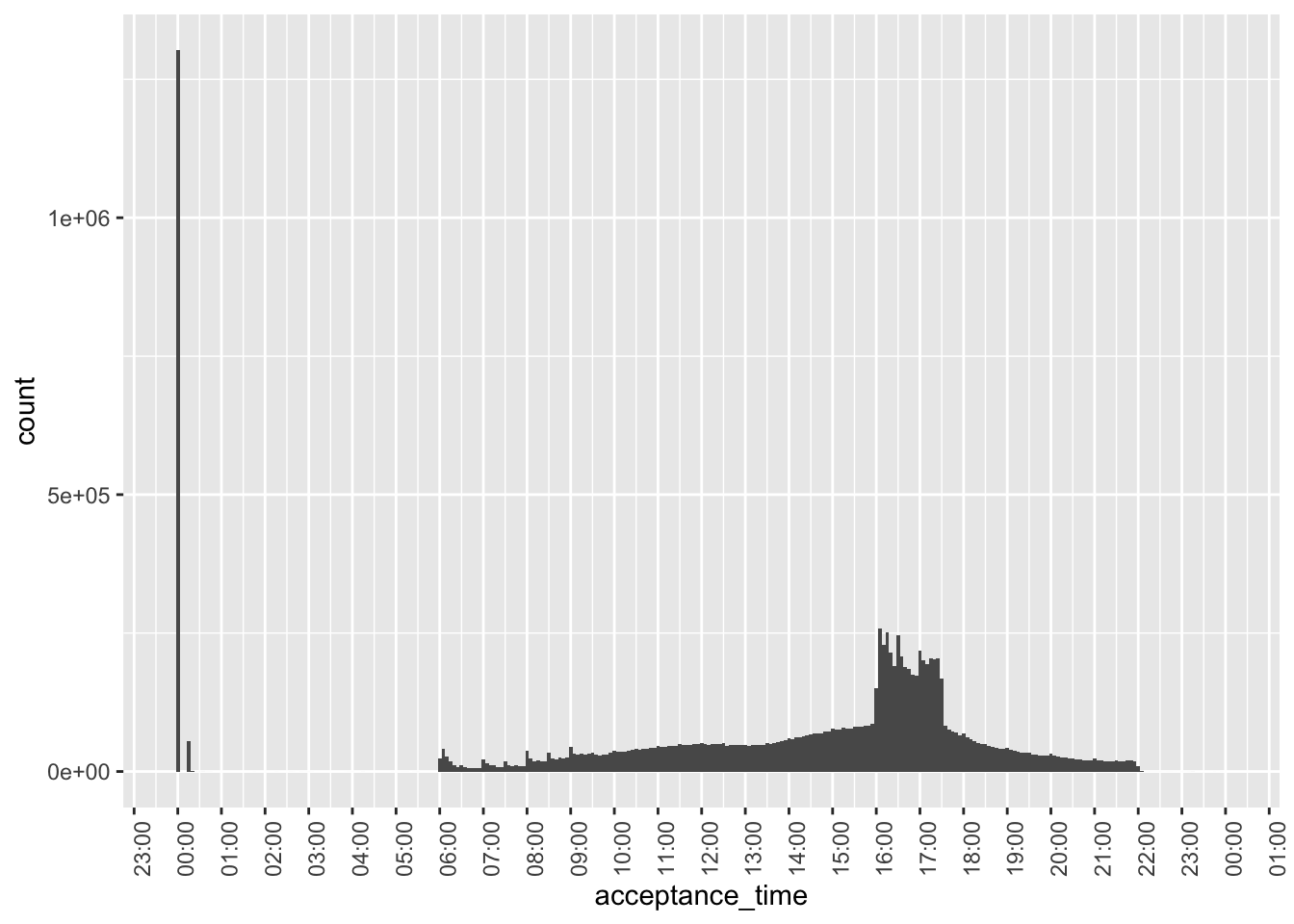
Figure 2 digs into these “midnight” filings based on the year of filing. It appears that the majority of these are from 2002 or earlier. A plausible explanation is that most filings during that earlier period only have filing dates and acceptanceDateTime is expressed as midnight on those filing dates.
In Figure 2, we also see evidence of a small number of filings for years 1980 and 1993. The former value probably relates to errors, but a small number of filings did occur in 1993.
filing_times |>
  mutate(midnight = acceptance_time == "2000-01-01") |>
  mutate(year = as.character(year)) |>
  count(year, midnight) |>
  collect() |>
  ggplot(aes(x = year, y = n, fill = midnight)) +
  geom_col() +
  theme(axis.text.x = element_text(angle = 90))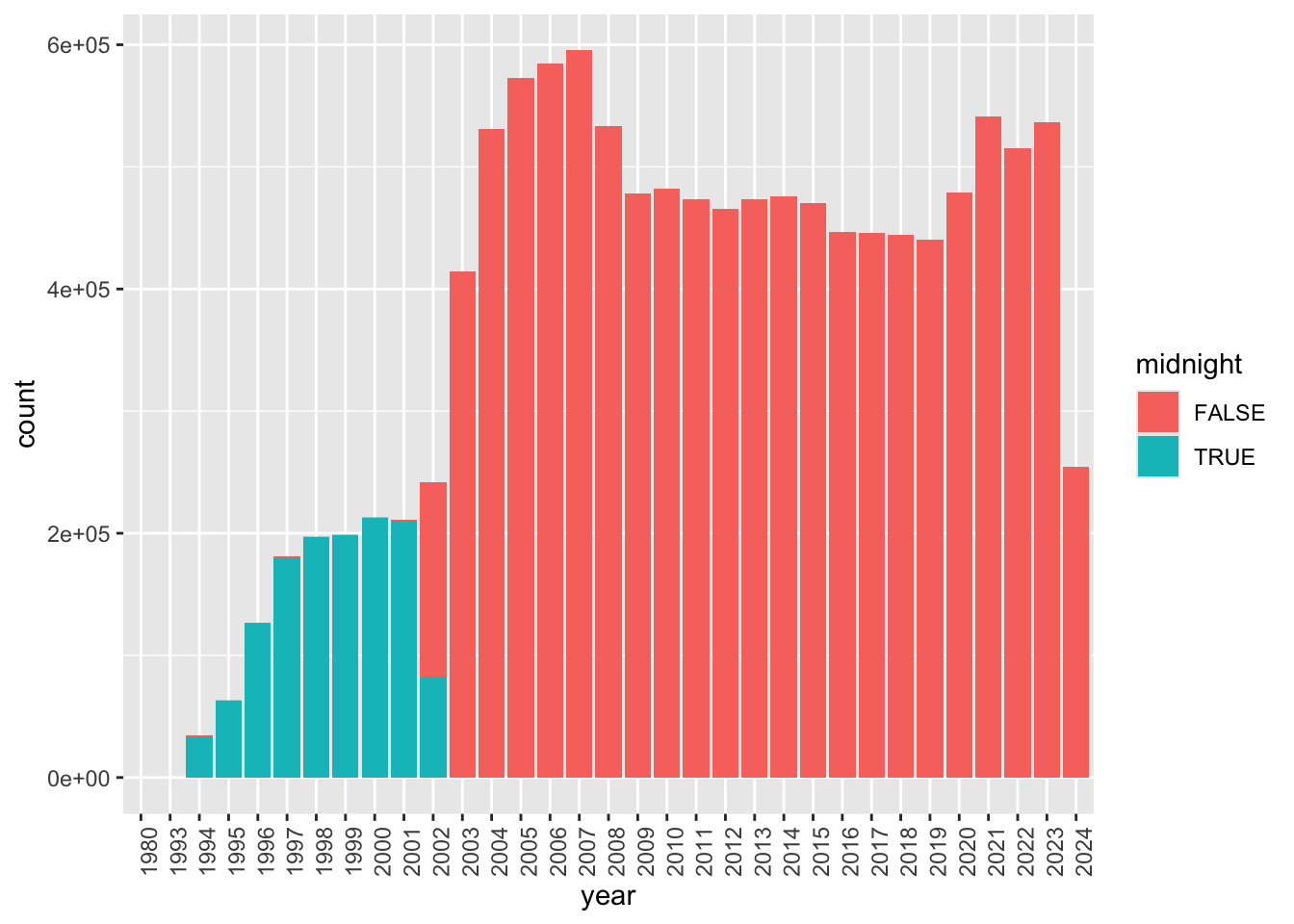
Figure 3 focuses on cases before 2002 with non-midnight acceptance times. While there are some, these appear to be very few in number, perhaps reflecting a pilot program of some sort.12 Note that—with one stray exception before 07:00—filings appear to occur between 08:00 and 22:00 during this period.
filing_times |>
  filter(year < 2002,
         acceptance_time != "2000-01-01") |>
  mutate(year = as.character(year)) |>
  count(acceptance_time, year) |>
  collect() |>
  ggplot(aes(x = acceptance_time, fill = year, weight = n)) +
  geom_histogram(binwidth = 5 * 60) +
  scale_x_datetime(date_breaks = "1 hour",
                   date_labels = "%H:%M") +
  theme(axis.text.x = element_text(angle = 90))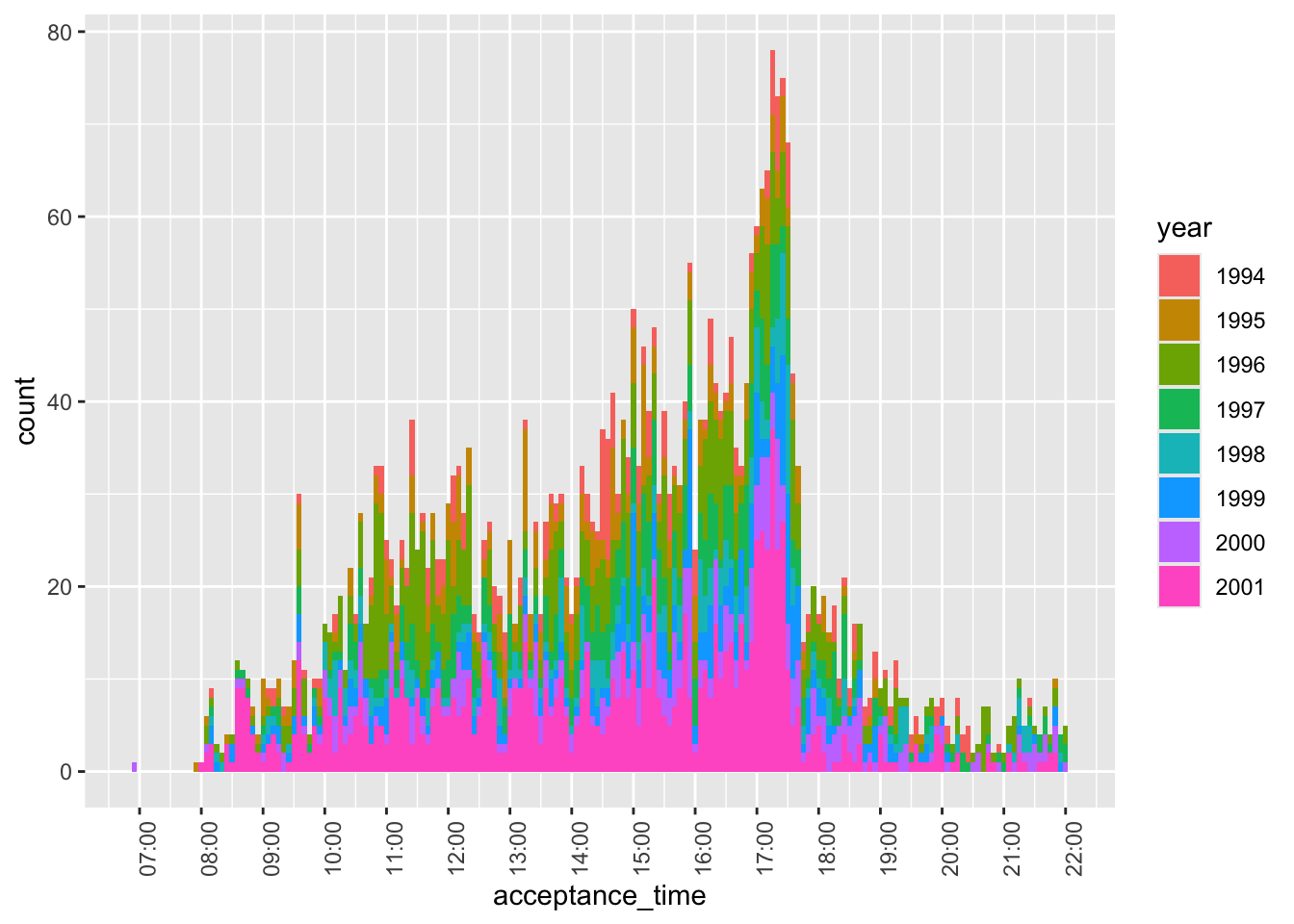
Figure 5 focuses on post-2001 non-midnight filings, where we see that the bulk of filings are between 06:00 and 22:00, consistent with the statement on the SEC website that “EDGAR is available to accept filings from 6 a.m. to 10 p.m. ET weekdays (except federal holidays).” These hours provide a useful diagnostic for timestamp problems, but they do not establish the timezone of an individual JSON clock. A UTC clock can fall within this window, and some genuinely Eastern timestamps fall outside it, so corrections require additional evidence.
However, some pre-08:00 filings appear in Figure 5. Filings accepted outside normal EDGAR hours—that is, after 22:00 and before 06:00—are not just a historical artifact. Figure 4 shows outside-hours filings from 2003 onward as a percentage of all filings in each year, split by form category. The correspondence category combines CORRESP, UPLOAD, and DRSLTR. The concentration at 00:15 is largely driven by EFFECT filings, which suggests that at least some of these times reflect SEC processing rather than ordinary filer submission behavior.
year_totals <-
  filing_times |>
  filter(year >= 2003) |>
  count(year, name = "year_filings") |>
  collect() |>
  mutate(year = as.integer(year))

filing_times |>
  filter(year >= 2003,
         acceptance_time > "2000-01-01 22:00:00" |
           acceptance_time < "2000-01-01 06:00:00") |>
  mutate(filing_category = case_when(
    form == "EFFECT" ~ "EFFECT",
    form %in% c("CORRESP", "UPLOAD", "DRSLTR") ~ "Correspondence",
    TRUE ~ "Other"
  )) |>
  count(year, filing_category) |>
  collect() |>
  mutate(year = as.integer(year)) |>
  left_join(year_totals, by = "year") |>
  mutate(filing_pct = n / year_filings,
         filing_category = factor(
           filing_category,
           levels = c("EFFECT", "Correspondence", "Other")
         )) |>
  ggplot(aes(x = year, y = filing_pct, fill = filing_category)) +
  geom_col() +
  scale_x_continuous(breaks = seq(2003, 2026, by = 2)) +
  scale_y_continuous(labels = percent) +
  labs(fill = NULL) +
  theme(axis.text.x = element_text(angle = 45, hjust = 1))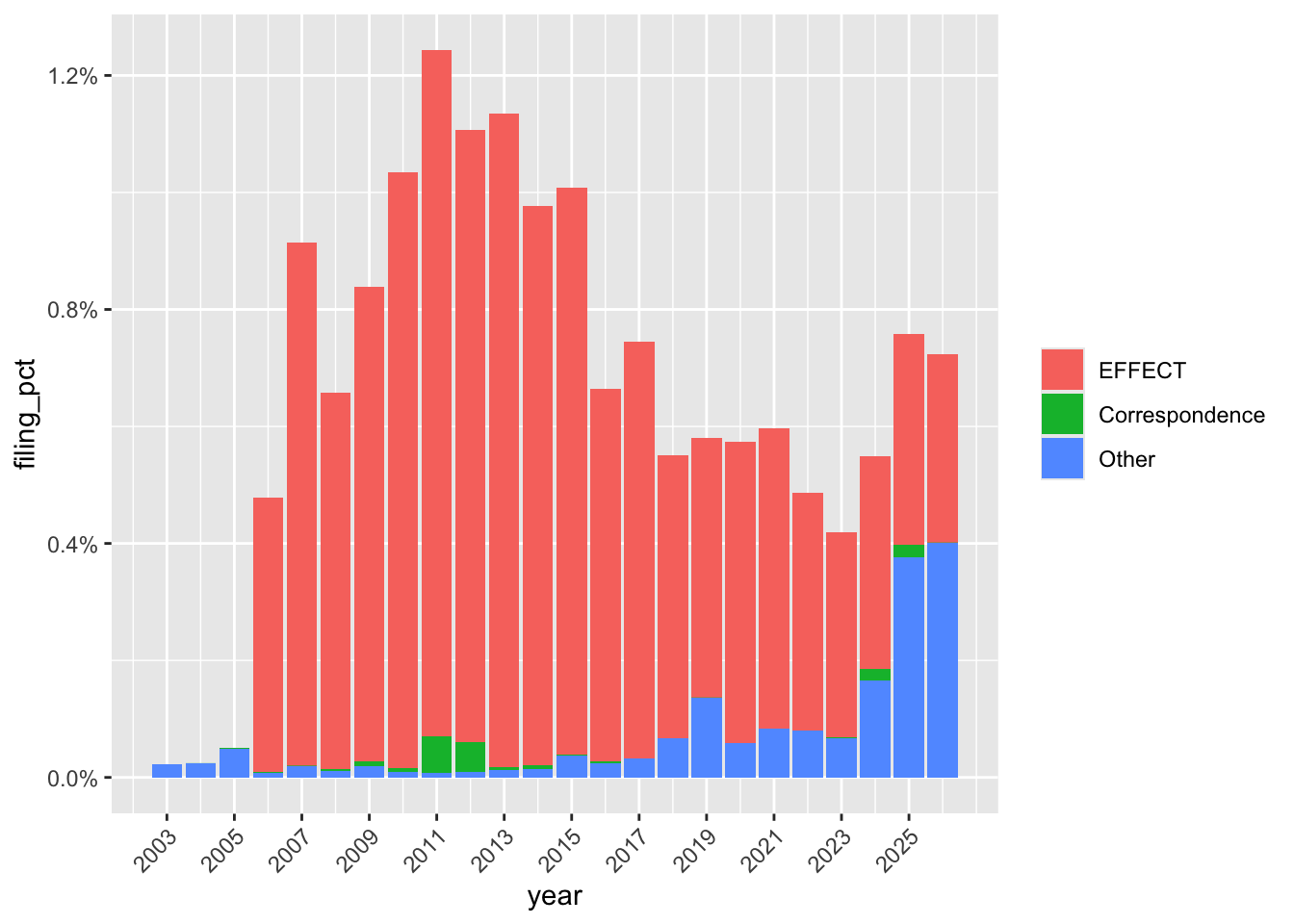
filing_times |>
  filter(year >= 2002,
         acceptance_time > "2000-01-01") |>
  count(acceptance_time) |>
  collect() |>
  ggplot(aes(x = acceptance_time, weight = n)) +
  geom_histogram(binwidth = 5 * 60) +
  scale_x_datetime(date_breaks = "1 hour",
                   date_labels = "%H:%M") +
  theme(axis.text.x = element_text(angle = 90))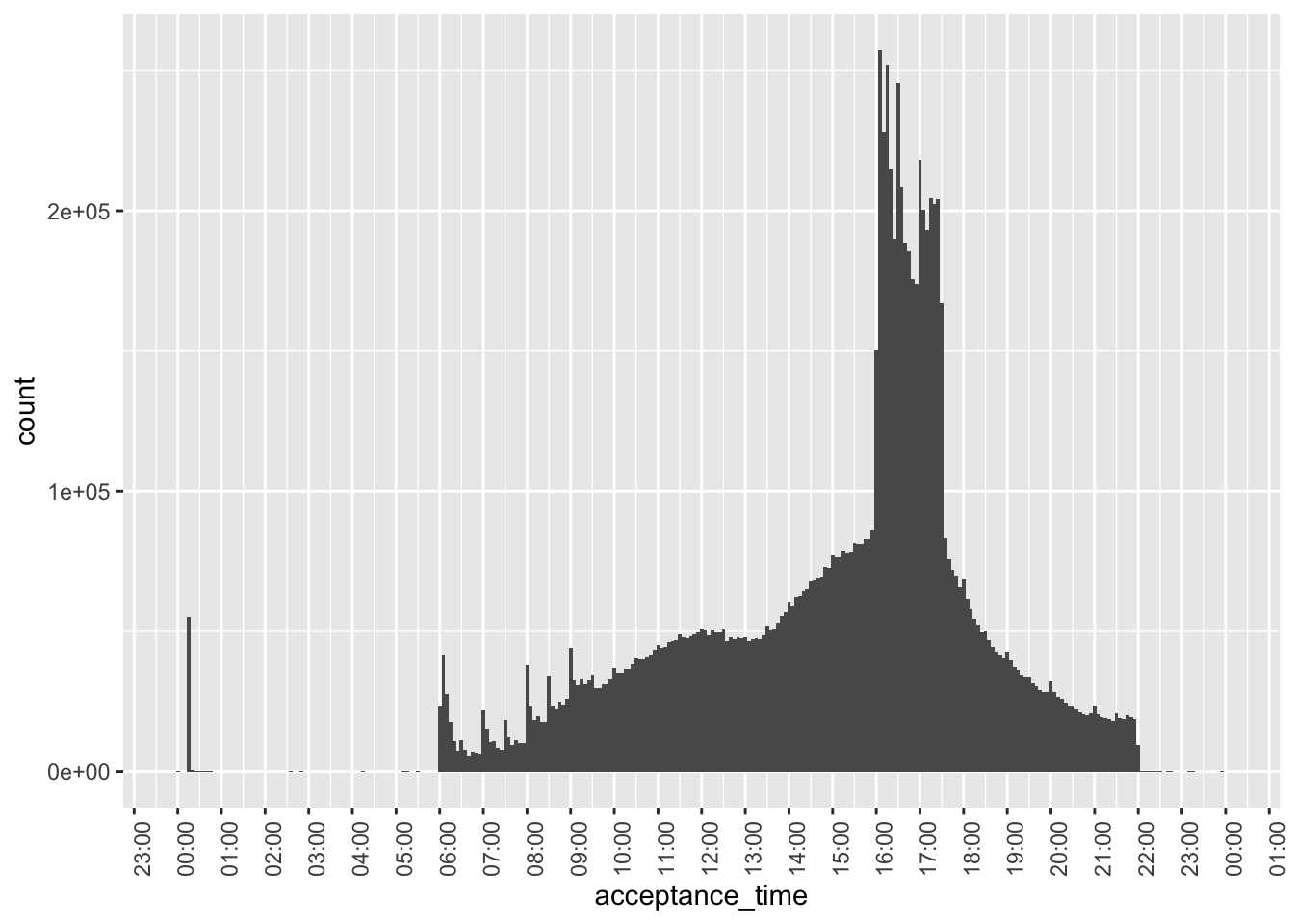
Figure 6 zooms in on the earliest of the pre-08:00 filings that appear in Figure 5, focusing on filings from just after midnight through 01:00. It appears that these are oddly concentrated at around 00:15 and are perhaps data errors.
filing_times |>
  filter(between(acceptance_time, "2000-01-01 00:00:01", "2000-01-01 01:00:00")) |>
  count(acceptance_time) |>
  collect() |>
  ggplot(aes(x = acceptance_time, weight = n)) +
  geom_histogram(binwidth = 1 * 60) +
  scale_x_datetime(date_breaks = "5 min",
                   date_labels = "%H:%M") +
  theme(axis.text.x = element_text(angle = 90))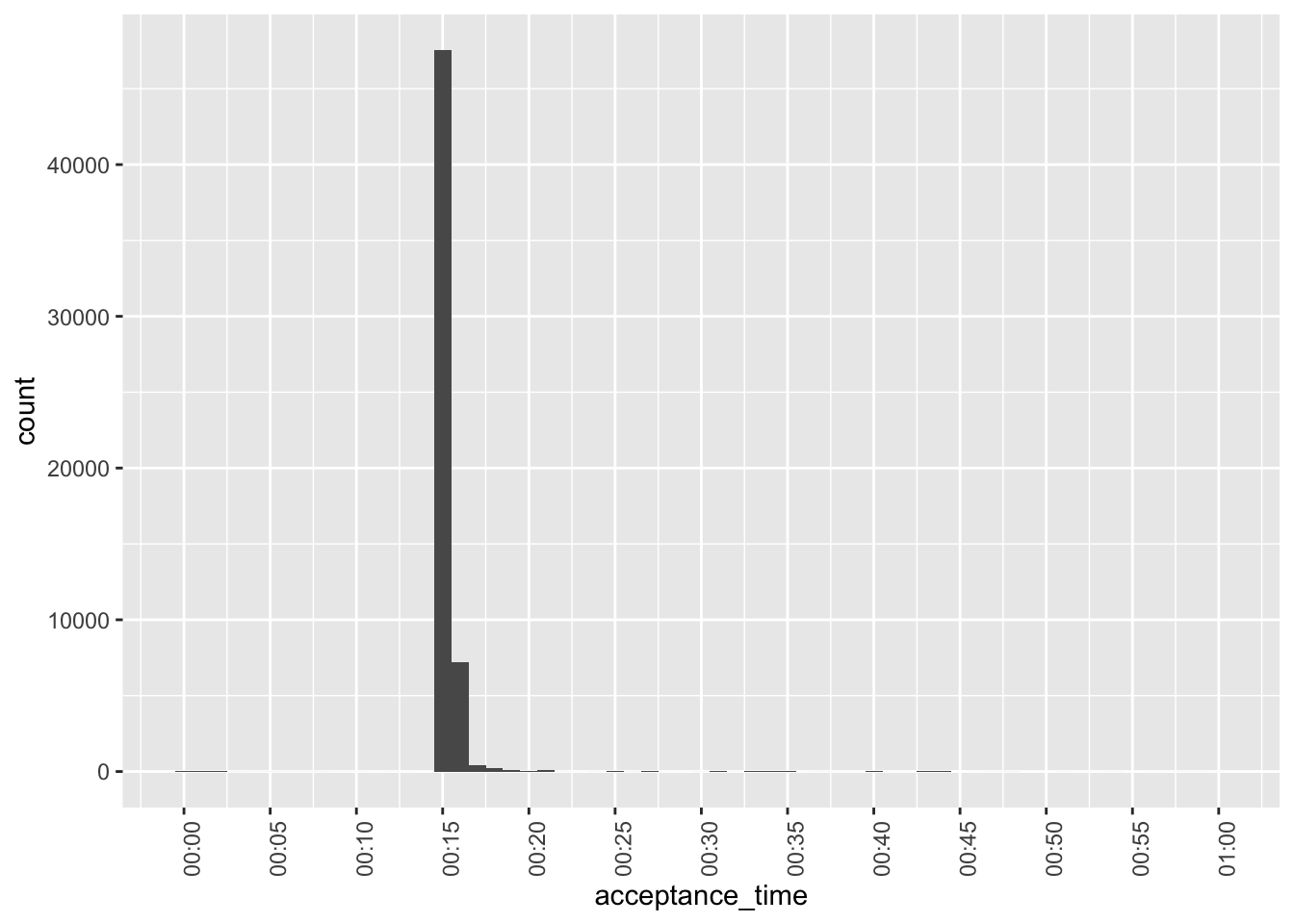
While not apparent in Figure 2, Figure 7 reveals that there are some post-2003 midnight filings. However, these are all concentrated in 2009 and are perhaps evidence of data issues.
filing_times |>
  mutate(year = year(acceptanceDateTime)) |>
  filter(year > 2003,
         acceptance_time == "2000-01-01 00:00:00") |>
  mutate(month = floor_date(acceptanceDateTime, "month")) |>
  count(month) |>
  ggplot(aes(x = month, y = n)) +
  geom_col() +
  scale_x_datetime(date_breaks = "1 year", date_labels = "%Y") +
  theme(axis.text.x = element_text(angle = 45, hjust = 1))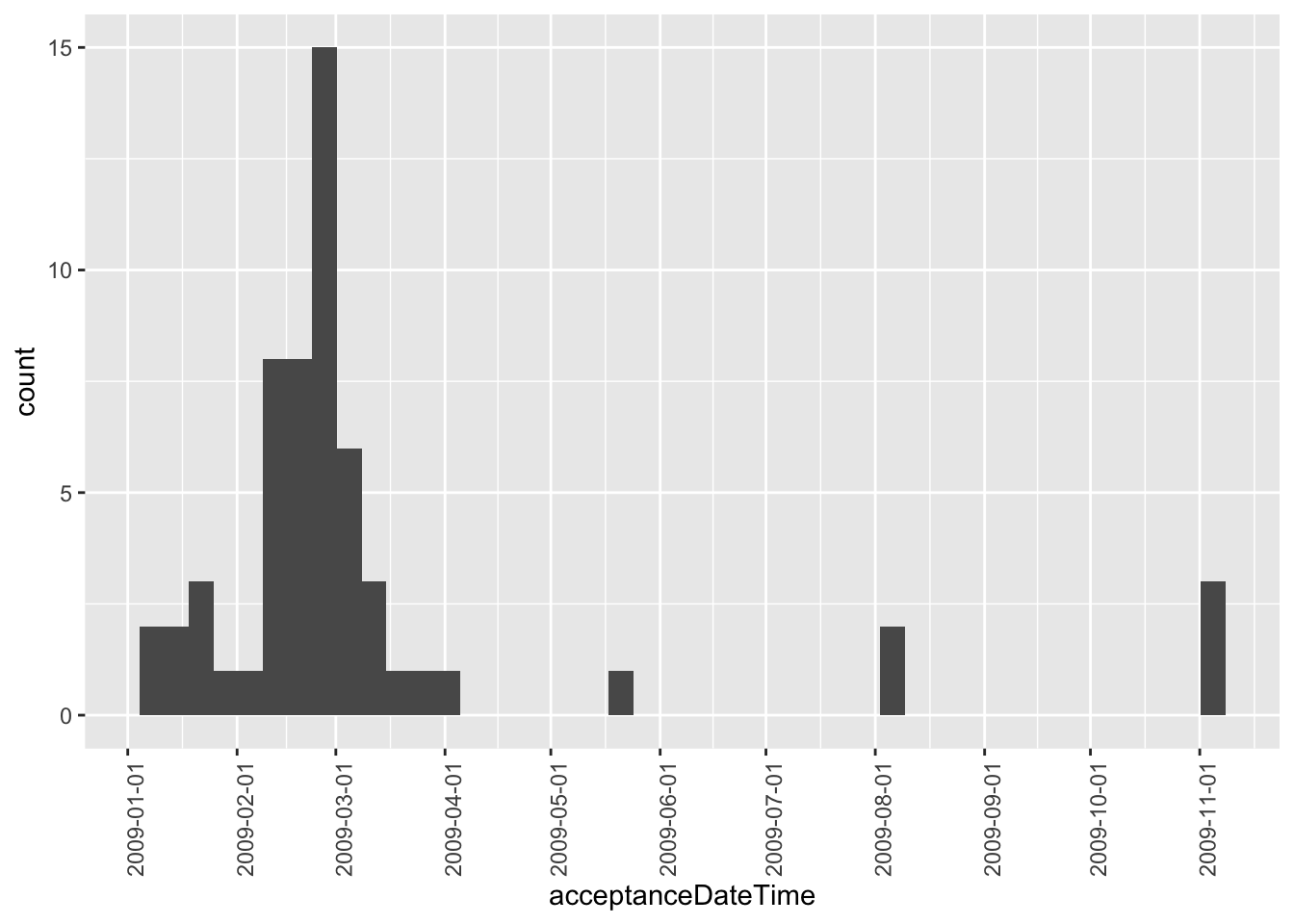
Given the issues revealed above, Figure 8—our final plot of acceptance times—focuses on filings after 2003 and with filing times after 05:00 and before 23:00.
filing_times |>
  filter(year > 2003,
         between(acceptance_time,
                 "2000-01-01 05:00:00",
                 "2000-01-01 23:00:00")) |>
  count(acceptance_time) |>
  collect() |>
  ggplot(aes(x = acceptance_time, weight = n)) +
  geom_histogram(binwidth = 5 * 60) +
  scale_x_datetime(date_breaks = "1 hour",
                   date_labels = "%H:%M") +
  theme(axis.text.x = element_text(angle = 90))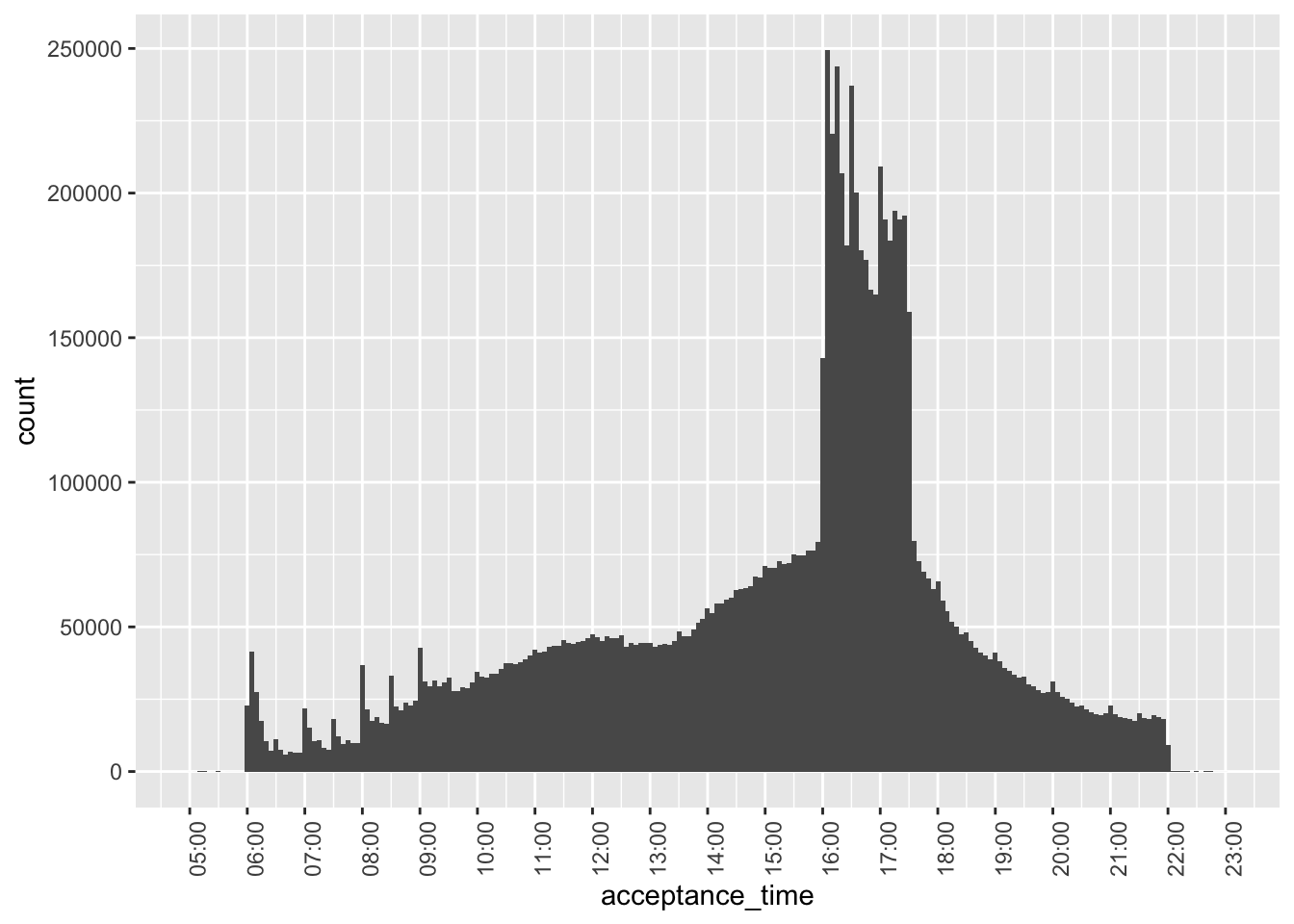
There are some interesting patterns to be observed in Figure 8.
- For filings before 10:00, there are spikes in the number of filings on the hour. This may reflect filings that are pre-programmed at specific times in pre-trading hours.13
- These spikes are not apparent during trading hours.
- There is a big spike in the number of filings just after 16:00, consistent with many filings being delayed until the close of trading.
- Putting aside the pre-trading spikes, there is a steady rise int he number of filings until about 12:00, then a flattening out till about 13:30, when filings steadily rise until 16:00.
- There is a sharp drop in the number of filings at about 17:30.
- After 17:30, the number of filings steadily decreases until 22:00.
- There are tiny spike on the hour after 17:00.
Merging with other data sets
To illustrate how one can merge across data sets we use a small sample related to the timing of earnings conference calls for Apple and Microsoft. The data are stored online, so we make use of the https package to read the data directly into DuckDB.
dbExecute(db, "INSTALL https")
dbExecute(db, "LOAD https")
In this case, we force DuckDB’s read_csv() function to store start_date with a time zone by setting the columns argument.
url <- "https://raw.githubusercontent.com/iangow/notes/main/data/sample_calls.csv"
sql <- dbplyr::sql(str_c("SELECT * FROM read_csv('", url, "', ",
                         "columns = {'ticker': 'TEXT','start_date': 'TIMESTAMPTZ'})"))
We create the variable filingDate, as we will merge using this variable and ticker.
sample_calls <-
  tbl(db, sql) |>
  mutate(filingDate = as.Date(start_date)) |>
  compute(name = "sample_calls", overwrite = TRUE)
If you compare the output below with underlying data (e.g., browseURL(url)), you can see that the underlying UTC timestamps are displayed below in the New York time zone because of the settings we chose above.
sample_calls |>
  collect(n = 5)
# A tibble: 5 × 3
ticker start_date filingDate
<chr> <dttm> <date>
1 AAPL 2003-01-15 17:00:00 2003-01-15
2 AAPL 2003-04-16 17:00:00 2003-04-16
3 AAPL 2003-07-16 17:30:00 2003-07-16
4 AAPL 2003-10-15 17:30:00 2003-10-15
5 AAPL 2004-01-14 17:00:00 2004-01-14If inspect filings for Form 8-K filings, we can see that the items field contains a comma-separated list of the items to which the 8-K relates.
filings |>
  filter(form == "8-K") |>
  select(cik, accessionNumber, acceptanceDateTime, items) |>
  collect(n = 3)
# A tibble: 3 × 4
cik accessionNumber acceptanceDateTime items
<int> <chr> <dttm> <chr>
1 19617 0001193125-25-020070 2025-02-04 16:30:10 3.03,5.03,8.01,9.01
2 19617 0001193125-25-013396 2025-01-27 16:36:36 8.01,9.01
3 19617 0001193125-25-012230 2025-01-24 16:28:50 8.01,9.01 We can use the DuckDB function regexp_split_to_table() to extract each item as a separate row. We will be interested in 8-K filings with item 2.02 (“Results of Operations and Financial Condition”).14
filings |>
  filter(form == "8-K") |>
  mutate(item = regexp_split_to_table(items, ",")) |>
  select(cik, accessionNumber, acceptanceDateTime, item) |>
  collect(n = 9)
# A tibble: 9 × 4
cik accessionNumber acceptanceDateTime item
<int> <chr> <dttm> <chr>
1 19617 0001193125-25-020070 2025-02-04 16:30:10 3.03
2 19617 0001193125-25-020070 2025-02-04 16:30:10 5.03
3 19617 0001193125-25-020070 2025-02-04 16:30:10 8.01
4 19617 0001193125-25-020070 2025-02-04 16:30:10 9.01
5 19617 0001193125-25-013396 2025-01-27 16:36:36 8.01
6 19617 0001193125-25-013396 2025-01-27 16:36:36 9.01
7 19617 0001193125-25-012230 2025-01-24 16:28:50 8.01
8 19617 0001193125-25-012230 2025-01-24 16:28:50 9.01
9 19617 0000019617-25-000056 2025-01-23 16:15:44 5.02 To merge sample_calls with filings, we need a mapping from tickers to CIKs. We can get the tickers file from Dropbox using the code below.15
url <- str_c("https://www.dropbox.com/scl/fi/lertyk4twnphum0g8wrjv/",
             "tickers.parquet?rlkey=mwm0m2m9c0ylg5h6yg1ivr38p&dl=1")
sql <- str_c("read_parquet('", url, "')")
tickers <-
  tbl(db, dbplyr::sql(str_c("SELECT * FROM ", sql))) |>
  compute(name = "tickers", overwrite = TRUE)
We can now create the table earnings_filings containing all 8-K filings with item 2.02.16
earnings_filings <-
  filings |>
  inner_join(tickers, by = "cik") |>
  mutate(item = regexp_split_to_table(items, ",")) |>
  filter(form == "8-K", item == "2.02") |>
  select(cik, ticker, filingDate, acceptanceDateTime, item)
We merge earnings_filings with sample_calls and calculate time_diff, the time between the filing of the 8-K and the start of the conference call.
sample_merged <-
  earnings_filings |>
  inner_join(sample_calls, join_by(ticker, filingDate)) |>
  mutate(time_diff = start_date - acceptanceDateTime) |>
  collect() |>
  system_time()
user system elapsed
0.537 0.090 0.112 We can now make a plot of time_diff, converting time_diff from seconds to minutes by dividing by 60 and converting to numeric.17
sample_merged |>
  mutate(time_diff = as.double(time_diff / 60)) |>
  ggplot(aes(x = time_diff, fill = ticker)) +
  geom_histogram(binwidth = 5)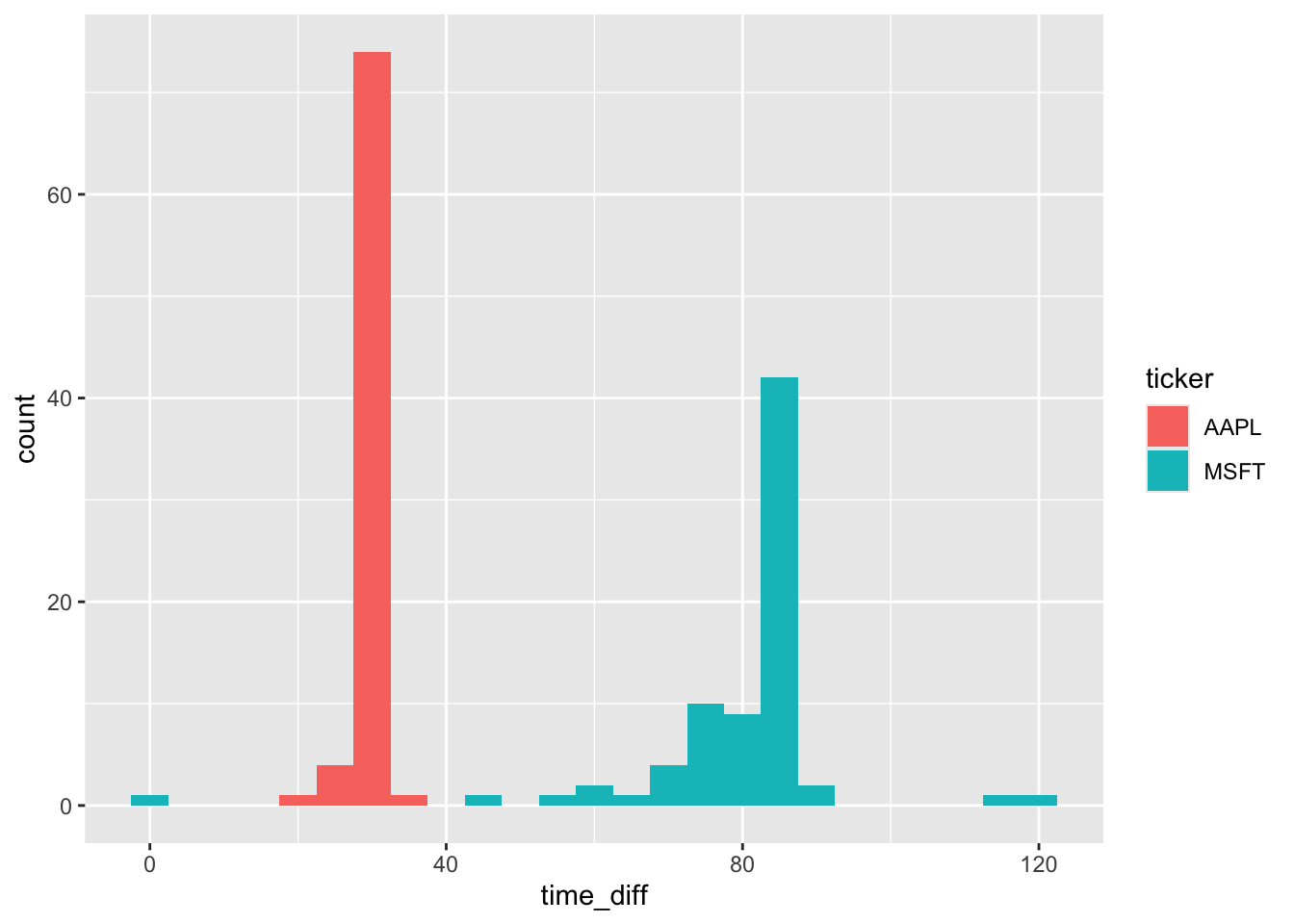
From Figure 9, we see that Microsoft (MSFT) and Apple (AAPL) have different approaches to filing 8-Ks before conference calls. In most cases, Apple files right around 30 minutes before the call. In contrast, Microsoft has more variation in its filing time, but it is generally gives the market more time to process the 8-K before the start of its call and the modal time is over 80 minutes. That said, there does appear to be one call where the 8-K was made right around the start of the conference call, though there is no discussion of this in the conference call transcript.
References
Gow, I.D., Ding, T., 2024. Empirical research in accounting: Tools and methods. Chapman & Hall/CRC, London, UK. https://doi.org/10.1201/9781003456230
Wickham, H., Çetinkaya-Rundel, M., Grolemund, G., 2023. R for data science. O’Reilly Media, Sebastopol, CA.
Footnotes
Gow and Ding (2024) was published in print form by CRC Press in December 2024 and remains free online.↩︎
Execute
install.packages(c("tidyverse", "DBI", "duckdb", "scales", "farr"))within R to install all the packages you need to run the code in this note.↩︎It is pointed out in that R does not have a native class for storing times (Wickham et al., 2023, p. 296).↩︎
For more on the data curation process as part of the data science workflow, see my note here.↩︎
After rummaging through the depths of the SAS documentation, I landed on
format=E8601DT19.as the way to represent date-times being exported by SAS.↩︎To see this, enter
as.Date("2024-01-31") + months(1)andas.Date("2024-02-29") + years(1), respectively.↩︎The
INSTALL icucommand is only needed if you have not already installed it, but it’s harmless to run it if it’s already present.↩︎The code below assumes that
DATA_DIRis set in the project.envfile and points to the root of that repository. The process for creating this file is described here. You can obtain a copy offilings.parquethere. If you do not use a Parquet data repository, placefilings.parquetin thedatasubdirectory of this project and usefilings <- load_parquet(db, table = "filings", data_dir = "data")instead.↩︎See the Wikipedia page for ISO 8601.↩︎
The correction workflow is documented here. The timestamps are stored as timezone-aware instants in Parquet and displayed here in New York time.↩︎
As mentioned above, R has no native type for times, but a set of date-times with the date fixed on a common date will provide us with what we need.↩︎
Though we might expect a preponderance of these filings to occur in the years just before 2002 in this case, and the filings appear to be fairly spread out over the pre-2002 years.↩︎
NYSE and NASDAQ trading hours are 09:30–16:00.↩︎
See the note discussed earlier for details on how this file was created from data on SEC EDGAR.↩︎
Note that we don’t strictly “create” this table in the sense of SQL’s
CREATE TABLEusingcompute(), as we will only use a small portion of it and it would be expensive—about 10 seconds and 1.5GB of RAM—tocompute()this whole table.↩︎By default, the result is a
difftime, whichggplot2is unsure about.↩︎