import pandas as pdGetting data out of Postgres: an update
Python
Parquet
db2pq
benchmarks
PostgreSQL
Abstract
The Arrow Parquet file format has emerged in recent years as a key enabler of several technologies that have the potential to revolutionalize data analysis. For example, Polars is a “next-generation” data frame library that is much faster and more memory-efficient than pandas, the dominant data frame library for Python. However, the performance and efficiency of Polars depends on having the data in an efficient form such as is offered by the Parquet format. Polars really loses its edge when the data it wants are located in a relational database. In such a case, a natural question is: How do get data out of the database and into Parquet files?
This note explores a few ways of getting Parquet files from a PostgreSQL database, showing how to use them and comparing them with each other.
This is an update to my 26 March 2026 note, with new package versions and benchmarks using my local PostgreSQL database.
1 PostgreSQL
In 2011, I was looking for a place to store my data that didn’t require SAS, or zillions of Stata files. After dabbling with SQLite and MySQL, I landed on PostgreSQL as the best system for storing my data. PostgreSQL allowed me extremely reliable storage of large amounts of data with fast access from R, Python, Stata and more.
The challenge back then was: How do I get my data into PostgreSQL? At the time, I was a faculty member at Northwestern University and a lot of my data came from Wharton Research Data Services, more commonly referred to as WRDS (pronounced “words”), and at that time WRDS provided data as SAS data files.
To get data from SAS data files into PostgreSQL, I used SAS PROC EXPORT to create CSV files and the PostgreSQL commands to get the data from the CSV files into PostgreSQL. Over time, this approach morphed into Perl scripts, then Python scripts, and finally the Python package wrds2pg, which was published on PyPI in April 2020. This package essentially runs SAS code that emits CSV data that is piped directly in to PostgreSQL.
When I first started using PostgreSQL, I remember I often had to compile it from source and it was pretty complicated. Today, I can just install Postgres.app using a point-and-click package and I can have a PostgreSQL database running with the simplest defaults ready to receive data in minutes.1
2 What’s the deal with Parquet?
One of the cool things about Parquet files is that any modern data science tool can work with them. Here I consider pandas, Polars and DuckDB. The examples use local copies of the data. The benchmarks use copies from my local PostgreSQL database, igow, in a separate local PostgreSQL instance so that I can test the server extensions together.
2.1 pandas
If you are a user of Python for data analysis, no doubt you do a lot of work with pandas, which has been the de facto standard data frame library in Python since about 2012.
Unlike systems such as Stata or SAS, there is no “pandas data file” format as such. My impression is that many pandas users store data as CSV files. Here I will focus on crsp.msf_v2, a data set that is at about the sweet spot in terms of size and complexity for illustrating some key ideas. For comparison, I also create a CSV copy of this data:
from pathlib import Path

parquet_file = Path("msf_v2.parquet")
csv_file = Path("msf_v2.csv")
pd.read_parquet(parquet_file).to_csv(csv_file, index=False, header=True)
If I have crsp.msf_v2 as a CSV file, I can read it in using pd.read_csv():
%%time
msf_v2 = pd.read_csv(csv_file, low_memory=False)
CPU times: user 16.1 s, sys: 2.29 s, total: 18.4 s
Wall time: 18.7 sBut if I had it as a Parquet file, I might be impressed with the performance of pd.read_parquet():
%%time
msf_v2 = pd.read_parquet(parquet_file)
CPU times: user 8.36 s, sys: 4.16 s, total: 12.5 s
Wall time: 10.2 s2.2 Polars
OK, I would only be impressed if I’d never used Polars, but I have used it and I import it here.2
import polars as plNow, how does pl.read_parquet() do with this file?
%%time
msf_v2 = pl.read_parquet(parquet_file)
CPU times: user 1.05 s, sys: 1.87 s, total: 2.91 s
Wall time: 2.05 sAgain, if I didn’t know Polars, I might be impressed. But in general you don’t want to use something as slow as pl.read_parquet() for many tasks. Instead, just use pl.scan_parquet().
%%time
msf_v2 = pl.scan_parquet(parquet_file)
CPU times: user 1.8 ms, sys: 20.2 ms, total: 21.9 ms
Wall time: 22.2 msOK, now I’m starting to be impressed. The surprising performance of pl.scan_parquet() comes from the fact that it’s not actually reading all the data into memory. And this saves both time and memory.
Why is this helpful? Well, the reality is that we rarely want all the columns or all the rows, and the Parquet file format allows Polars to quickly pull in precisely the data that the analyst wants. Suppose we were interested in data from 2023 and just wanted returns and prices. This will do the trick:
%%time
msf_v2_2023 = (
    msf_v2
    .filter(pl.col("mthprcdt").dt.year() == 2023)
    .select("permno","mthprcdt", "mthret", "mthprc")
    .collect()
)
CPU times: user 64.3 ms, sys: 49.1 ms, total: 113 ms
Wall time: 33.7 msAnd to prove that something happened, let’s look at the data:
msf_v2_2023
shape: (113_695, 4)
| permno | mthprcdt | mthret | mthprc |
|---|---|---|---|
| i32 | date | decimal[10,6] | decimal[13,6] |
| 10026 | 2023-01-31 | -0.042816 | 143.300000 |
| 10026 | 2023-02-28 | -0.014585 | 141.210000 |
| 10026 | 2023-03-31 | 0.054785 | 148.220000 |
| 10026 | 2023-04-28 | 0.033599 | 153.200000 |
| 10026 | 2023-05-31 | 0.004896 | 153.950000 |
| … | … | … | … |
| 93436 | 2023-08-31 | -0.034962 | 258.080000 |
| 93436 | 2023-09-29 | -0.030456 | 250.220000 |
| 93436 | 2023-10-31 | -0.197346 | 200.840000 |
| 93436 | 2023-11-30 | 0.195379 | 240.080000 |
| 93436 | 2023-12-29 | 0.034988 | 248.480000 |
So, if msf_v2_2023 were what we wanted, Polars gets it us hundreds of times faster than using pandas does, and while using much less RAM.3 These differences are probably not such a big deal with “medium-sized” tables such as crsp.msf_v2. But, if you’re working with larger data, it can quickly become simply impossible to work with data in pandas without using various complicating approaches, such as batching analyses and pasting together the results.4
2.3 DuckDB
Another tool that works well with Parquet files is DuckDB. DuckDB offers a rich SQL covering much of what PostgreSQL and in many areas even more. Unlike PostgreSQL, one does not need to set up a server to use DuckDB. I can simply import the library.
import duckdbThen I can use the duckdb.read_parquet() function to do much the same thing as pl.scan_parquet().5
%%time
msf_v2 = duckdb.read_parquet(parquet_file)
CPU times: user 3.93 ms, sys: 1.58 ms, total: 5.51 ms
Wall time: 6.54 msAnd much like with Polars I can then quickly get precisely the data I need. There are many ways to work with DuckDB and one interface uses SQL.6 The .pl() at the end returns a Polars data frame (.df() would give me a pandas data frame).
%%time
msf_v2_2023 = duckdb.sql("""
    SELECT permno, mthprcdt, mthret, mthprc
    FROM msf_v2
    WHERE year(mthprcdt) = 2023
""").pl()
CPU times: user 97.6 ms, sys: 24.5 ms, total: 122 ms
Wall time: 22 msFrom the following, we can see that we’ve got the same data we got through the Polars path above:
msf_v2_2023
shape: (113_695, 4)
| permno | mthprcdt | mthret | mthprc |
|---|---|---|---|
| i32 | date | decimal[10,6] | decimal[13,6] |
| 10026 | 2023-01-31 | -0.042816 | 143.300000 |
| 10026 | 2023-02-28 | -0.014585 | 141.210000 |
| 10026 | 2023-03-31 | 0.054785 | 148.220000 |
| 10026 | 2023-04-28 | 0.033599 | 153.200000 |
| 10026 | 2023-05-31 | 0.004896 | 153.950000 |
| … | … | … | … |
| 93436 | 2023-08-31 | -0.034962 | 258.080000 |
| 93436 | 2023-09-29 | -0.030456 | 250.220000 |
| 93436 | 2023-10-31 | -0.197346 | 200.840000 |
| 93436 | 2023-11-30 | 0.195379 | 240.080000 |
| 93436 | 2023-12-29 | 0.034988 | 248.480000 |
3 Getting data into Parquet form
In late 2023, I decided to make a “Parquet path” for the book I was then working on Empirical Research in Accounting: Tools and Methods, which was later published with CRC Press and which used R for data analysis. This “Parquet path” combined Parquet files with DuckDB and the dbplyr library in R to create a an alternative to the main “PostgreSQL path” of that book with only very minor tweaks to the code.
For this purposes, I pulled together a quick-and-dirty package db2pq, which creates Parquet files from PostgreSQL sources, including special functions to manage a local repository of WRDS data.7
Recently, I have noticed a lot of buzz around ADBC, which stands for Arrow Database Connectivity. The Apache Arrow project is closely related to the Apache Parquet project and I figured that that ADBC might provide a better way to get data from PostgreSQL to Parquet files.
In this note, I give some first impressions of using ADBC for this purpose and compare it with three alternative approaches.
3.1 Method 1: The DuckDB path of db2pq
The db2pq Python package allows a user to export a table from PostgreSQL to Parquet with a number of options, including the ability to select certain columns or filter only rows meaning certain conditions. It also allows the user to modify data types (e.g., have a floating-point number be read as an integer).
The main “engine” of db2pq has DuckDB read data from PostgreSQL and produce batches of Arrow output that are written to disk. The batching is necessary to ensure that large tables can be processed without swamping the memory of the user’s computer.
While DuckDB supports writing directly to Parquet files, when I worked with this in 2023, I found it very difficult to prevent DuckDB from flooding RAM, and so I implemented a suite of functions that make up the core of the db2pq package.
The db2pq package also offers other goodies, such as only writing files when the data in PostgreSQL is newer than that in the Parquet file, as illustrated here:
Note
The wrds_update_pq() examples in this section and the next retain their output from March 2026. I no longer have access to WRDS, so these examples are not rerun when rendering this note. The updated benchmarks below use my local PostgreSQL database.
from db2pq import wrds_update_pqwrds_update_pq("msf_v2", "crsp")Updated crsp.msf_v2 is available.
Beginning file download at 2026-03-26 19:56:53 UTC.
Completed file download at 2026-03-26 20:00:28 UTC.wrds_update_pq("msf_v2", "crsp")crsp.msf_v2 already up to date.3.2 Method 2: The ADBC path of db2pq
In March 2026, I decided to add an ADBC “engine” to db2pq. I was interested to know whether it would deliver better performance. It turns out that it doesn’t—at least, not yet—but it was a useful exercise to understand a little more about ADBC.
To use the ADBC engine with db2pq, I simply say engine="adbc" when calling wrds_update_pq().
wrds_update_pq("msf_v2", "crsp", engine="adbc")crsp.msf_v2 already up to date.Here I discuss two among several things I learnt about ABDC. First, the ADBC drivers incur a significant one-time cost when setting a database for connection. As we will see, the first export takes longer on my computer; in the original March 2026 tests, setting up the connection took over 20 seconds for the WRDS server. I infer that ADBC driver wants to know everything about the database it is connecting to before doing any work and it takes a lot longer for the WRDS database to tell its story that it does for my cheerful little home database.8
The second thing I learnt is that the ADBC drivers are very conservative when it comes to mapping data types. For example, the mthret column from the crsp.msf_v2 table that we saw above is stored in PostgreSQL as NUMERIC(10, 6), which means its a precise representation of a number with 10 digits, 6 of which come after the decimal point. You might think that the ABDC driver would immediately think “hey, that’s the same thing as pa.decimal128(10, 6)” (here pa stands for pyarrow, the Python package for Arrow). But instead, the driver documentation for the ADBC driver for PostgreSQL states that “NUMERIC types are read as the string representation of the value, because the PostgreSQL NUMERIC type cannot be losslessly converted to the Arrow decimal types.”
In implementing the ADBC “engine”, I tweaked the implementation of functions such as wrds_update_pq() so that the one-time cost of setting up a database for connections with ADBC only happens once in a Python session. This is often fine even if that set-up takes more than 20 seconds because the Python session will run for minutes or even hours to download data.
I also gave the user the flexibility to specify how NUMERIC types are handled using the numeric_mode argument. With numeric_mode="float64" the values are cast by PostgreSQL to DOUBLE PRECISION before the ADBC driver sees them, so they end up as Float64 types. If numeric_mode="decimal" the values are given to the ADBC driver as text, but these values are converted to nearest Arrow decimal types using the precision-scale metadata for the columns provided by PostgreSQL. Finally, numeric_mode="text" falls back to the default handling described by the Arrow documentation above.
3.3 Method 3: The pg_parquet PostgreSQL extension
The third contender is the pg_parquet PostgreSQL extension. The Postgres.app site offers a number of PostgreSQL extensions. These “are very easy to install – just download and double click the installer package! After restarting the server [also very easy with Postgres,app], you can enable them with the CREATE EXTENSION command.””
The pg_parquet PostgreSQL extension is one of several made available on the Postgres.app website. There it says: “Apache Parquet is gaining popularity as an interchange format for datasets. This extension allows you to read and write Parquet files using the COPY command. The extension was developed by CrunchyData and documentation is available at github.com/CrunchyData/pg_parquet.”
With this extension I can run SQL like this:
COPY crsp.msf_v2 TO '/tmp/msf_v2.parquet' (format 'parquet')An obvious limitation of pg_parquet is that you need to have administrative privileges for the database you want to get data from. So clearly it’s not useful to a user of the WRDS database (unless WRDS were to install it, of course).
There is a complication if pg_duckdb, the next contender, is also installed: both extensions can handle the same COPY command. To give pg_parquet the first opportunity to handle it, I put pg_duckdb before pg_parquet in the server’s shared_preload_libraries setting and restart the server:
shared_preload_libraries = 'pg_duckdb, pg_parquet'I can then select pg_parquet explicitly for the session:
SET duckdb.force_execution = off;
SET pg_parquet.enable_copy_hooks = on;
COPY crsp.msf_v2 TO '/tmp/msf_v2.parquet' (format 'parquet');
Setting pg_parquet.enable_copy_hooks = off instead allows pg_duckdb to handle the command. The preload order matters here: changing this setting does not help if pg_duckdb gets the command first. For the benchmarks, I also check the created_by field in each Parquet file’s metadata to verify which writer produced it.
3.4 Method 4: The pg_duckdb PostgreSQL extension
The pg_duckdb extension puts DuckDB inside PostgreSQL. This is different from the DuckDB path of db2pq, where DuckDB runs in Python and reads data from a PostgreSQL server.
For this update, I built development revision ee38d3b, which uses DuckDB 1.5.4. It reports SQL extension version 1.2.0, but this is not a released version of pg_duckdb. The build script records the source revision, builds for Apple Silicon using Postgres.app’s headers, and keeps a matching copy of the DuckDB library alongside the extension.
The current build still has a problem with a column called at when it rewrites an ordinary COPY query. But I can avoid that rewriting by sending the query directly to DuckDB:
SELECT duckdb.raw_query($$
    COPY (SELECT * FROM pgduckdb.comp.funda)
    TO '/tmp/funda.parquet' (format 'parquet')
$$);
Here pgduckdb is the name DuckDB uses for the PostgreSQL catalog. This exports all 949 columns of comp.funda, including at, and is the path I use for pg_duckdb below.9
This also appears to explain a mystery in the March note. In separate tests, pg_parquet 0.4.0 and 0.5.1 both exported at without difficulty and took about 198 and 196 seconds, respectively, to export comp.funda. When I loaded my February build of pg_duckdb alongside pg_parquet, the at error returned and the export took 16.8 seconds after excluding that column, compared with 17.8 seconds in March. For crsp.msf_v2, the same test took 7.66 seconds, compared with 7.65 seconds in March. The files from these tests identify DuckDB as their writer. So the March results labelled pg_parquet were probably produced by pg_duckdb, although I do not have the original server configuration or exported files to establish that conclusively.
4 Benchmark analysis
Now that I have my four contenders, I run some benchmarks. I copied 50,000 rows of comp.company, all 935,204 rows of comp.funda, and all 5,240,606 rows of crsp.msf_v2 into the test instance. All four engines use those same tables, with db_to_pq() used for the first two contenders, COPY for pg_parquet, and duckdb.raw_query() for pg_duckdb. Each export includes all columns. In particular, none of the comp.funda exports excludes at. Each bar represents a single export, with ADBC run twice for the small table to show first-run overhead. The benchmarks below were rerun on 8 October 2026 using the following versions.
| Package or server | Version |
|---|---|
| db2pq | 0.3.0 |
| duckdb | 1.5.6 |
| adbc-driver-postgresql | 1.12.0 |
| adbc-driver-manager | 1.12.0 |
| pyarrow | 25.0.1 |
| pandas | 3.0.6 |
| polars | 2.0.0 |
| psycopg | 3.3.6 |
| matplotlib | 3.11.2 |
| seaborn | 0.13.2 |
| PostgreSQL | 18.6 (Postgres.app) |
| pg_parquet | 0.5.1 |
| pg_duckdb (SQL version) | 1.2.0 |
| DuckDB (inside pg_duckdb) | v1.5.4 |
| pg_duckdb (source commit) | ee38d3b540ec |
4.1 Small queries
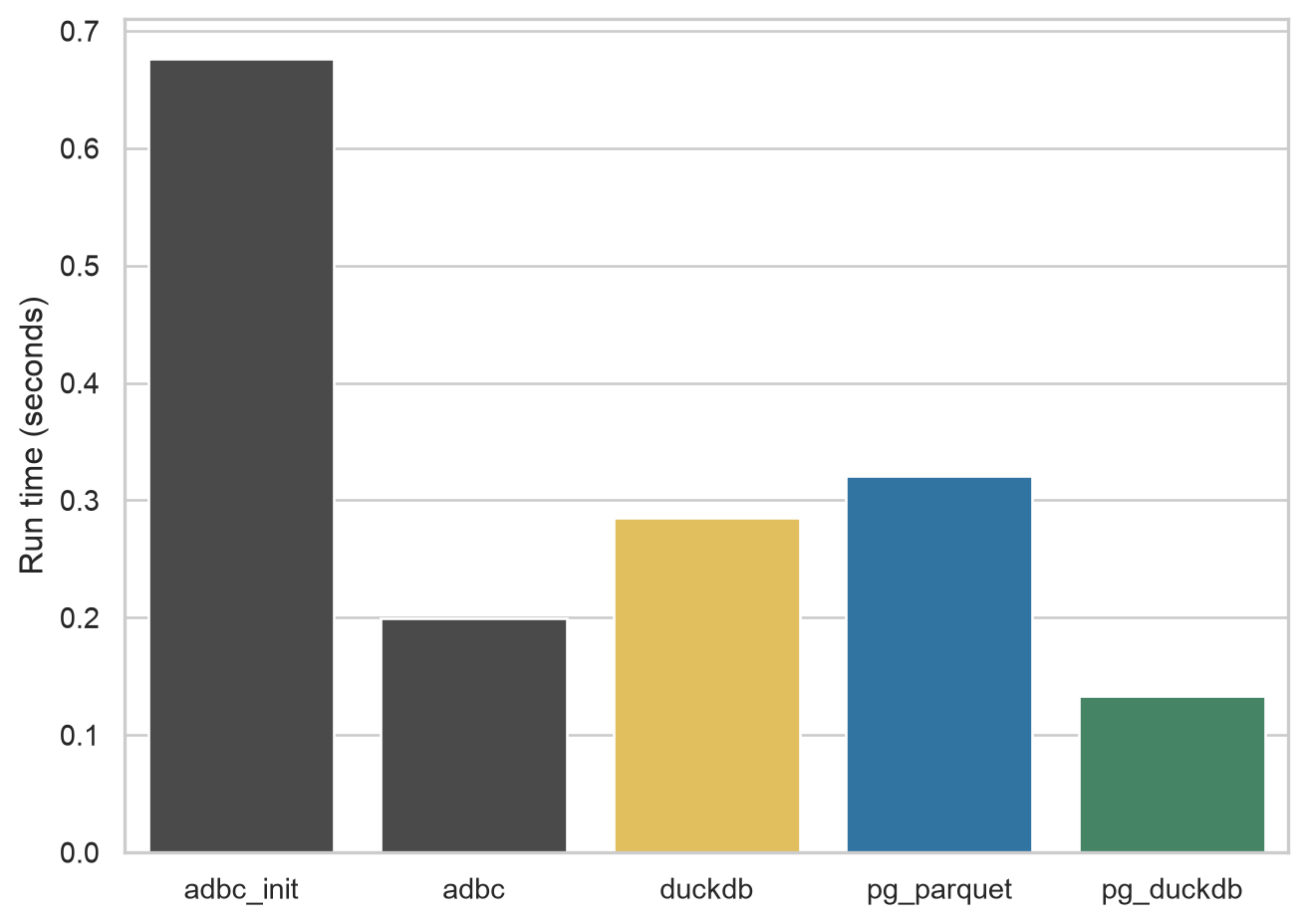
The first export I look at is 50,000 rows from comp.company, which results in Parquet files of about 9 MiB. This small export allows me to demonstrate the cost of the first ADBC export within a Python instance. For the ADBC engine I run the query twice and you can see that the first time (adbc_init in Figure 1) is about half a second longer than the second time (adbc). This difference includes initialization and connection setup; it is not a separate measurement of connection time. The test instance contains only the three benchmark tables, so it has much less metadata to inspect than my usual database.
In the original March 2026 tests, this setup took at least 20 seconds on the WRDS server. It seems that ADBC is doing a lot of “introspection” of the database each time a new database is established and this is a cost that is incurred for each run of Python (at least).
comp.company
4.2 Larger query, wide table
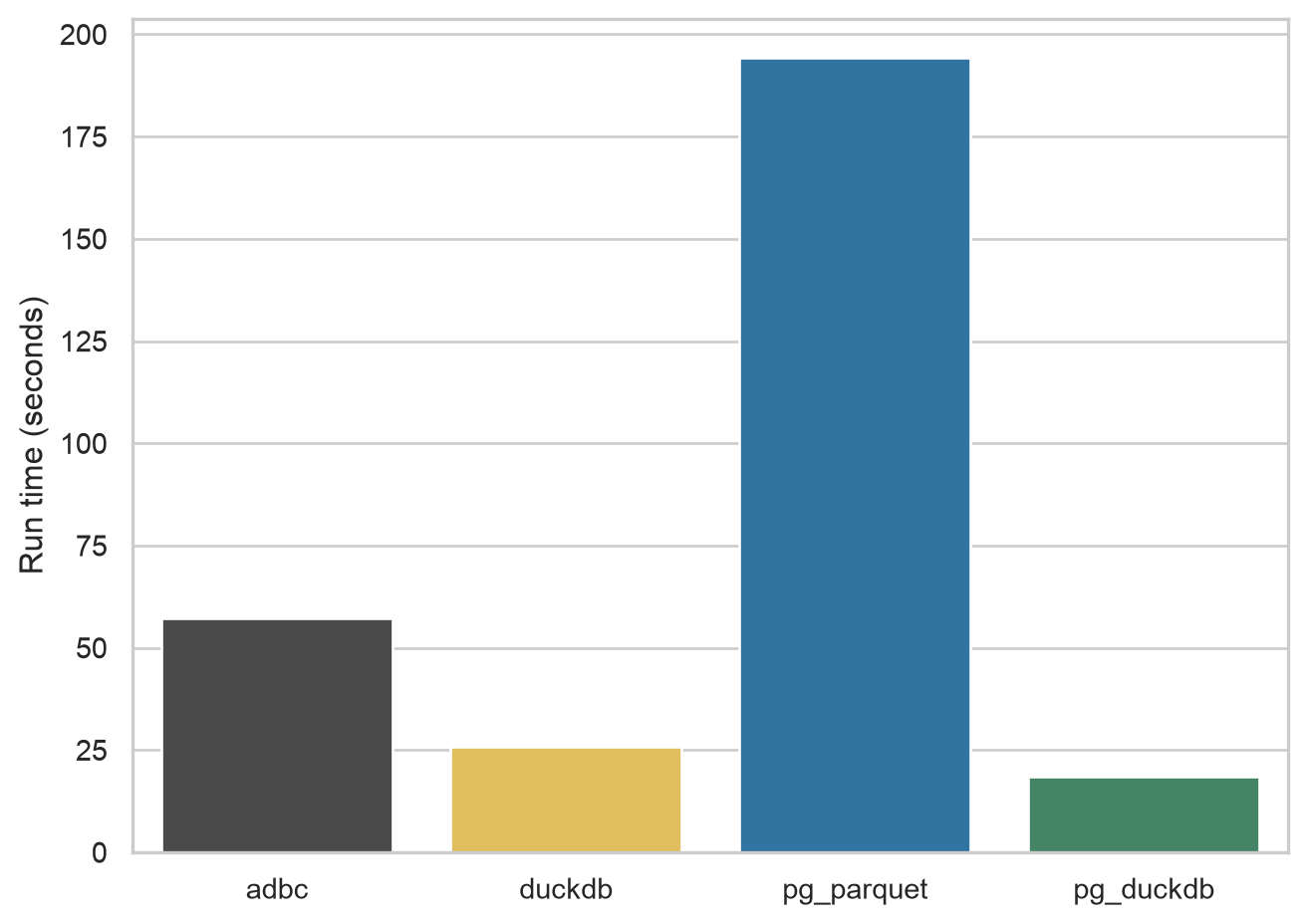
For the next query, I look at comp.funda, a table of financial statement information for (primarily) US companies. This table has over 900,000 rows and more than 900 variables, so it’s a fairly wide table. The resulting Parquet files range from 407 to 455 MiB in size.
As can be seen in Figure 2, pg_duckdb is fastest with this table at about 18 seconds, followed by the DuckDB engine of db2pq at 26 seconds, ADBC at 57 seconds, and pg_parquet at 194 seconds.
comp.funda
4.3 Larger query, long table
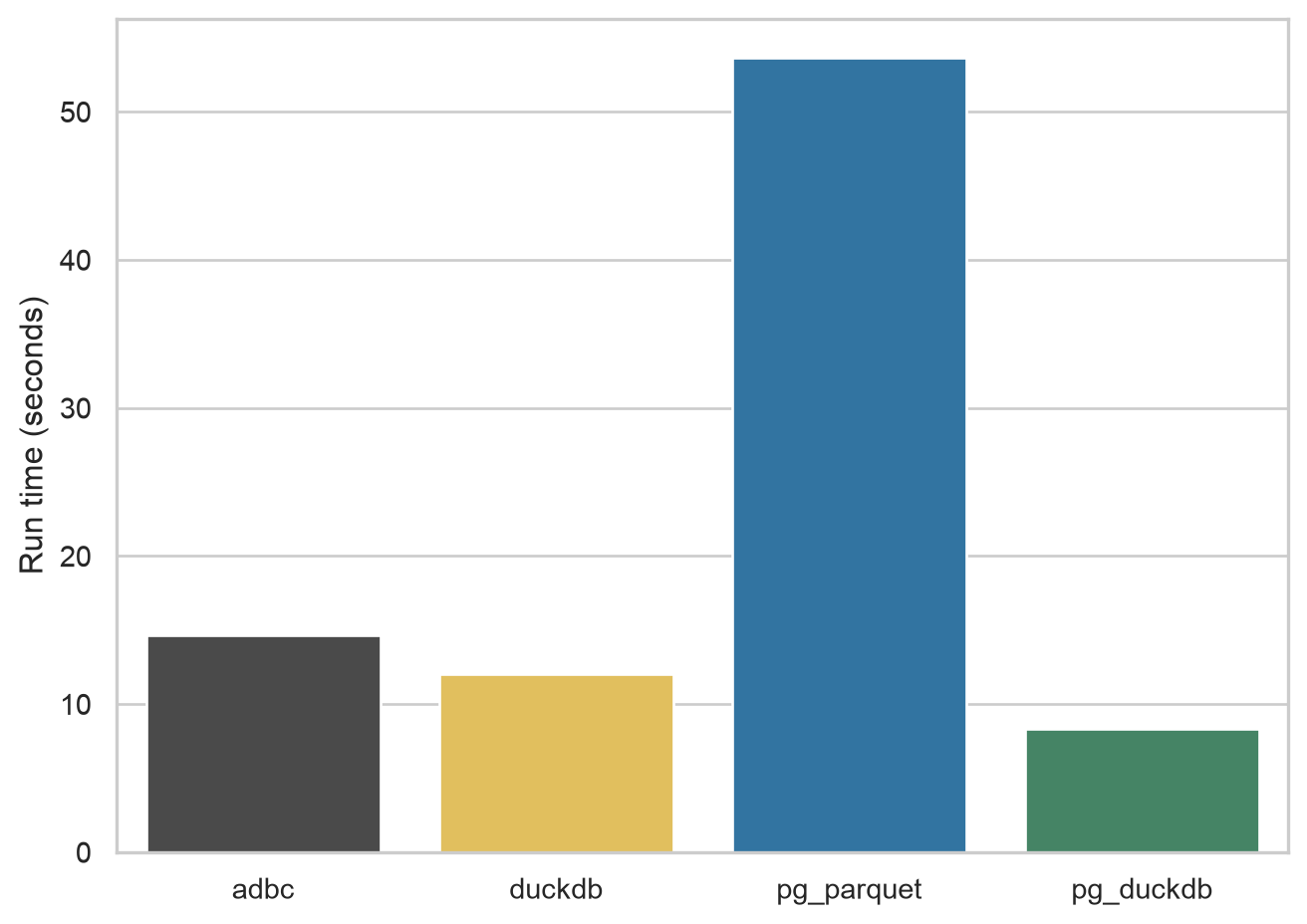
For the next query, I look at crsp.msf_v2, a table of monthly data on the stock prices of US companies. This table has over 5,000,000 rows and 45 columns. It also has several columns that are stored in PostgreSQL as NUMERIC types (e.g., mthret). The resulting Parquet files range from 206 to 231 MiB in size.
As can be seen in Figure 3, pg_duckdb again leads at about 8 seconds, followed by the DuckDB engine of db2pq at 12 seconds, ADBC at 15 seconds, and pg_parquet at 54 seconds.
crsp.msf_v2
Footnotes
Unfortunately, Postgres.app is MacOS only.↩︎
When I wrote the original March note, I had only been using Polars for about two months.↩︎
The pandas version of
msf_v2occupies more than 8 GB of RAM.↩︎Another benefit is that the Parquet file occupies about 243 MB, versus 1.45 GB for the CSV file.↩︎
Yes, this is a bit confusing.↩︎
You can also use an SQL interface with Polars.↩︎
A similar story is seen with connecting to ADBC databases with R, though it’s only nine seconds for WRDS to tell ABDC about itself. An issue with having an ADBC engine for the R version of
db2pqis that the CRAN version ofadbcpostgresqldoes not come with SSL support and I don’t want to be askingdb2pqusers to be compiling libraries against versions oflibpq, etc.↩︎I also encountered a hang in a separate one-row
duckdb.raw_query()export with this development build. The full-table benchmarks below completed, but that small-query issue remains unresolved.↩︎